// Prompts
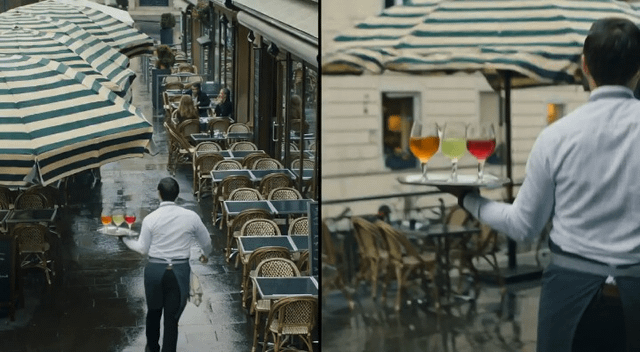
Split-screen video of café scene
Generate a split-screen video showing the same continuous real-time event from two different synchronized camera angles.
LDLatentDaily Desk
Jul 27, 2026
2 min read
Generate a split-screen video showing the same continuous real-time event from two different synchronized camera angles.
🤖 Works with: Flux 3
The Prompt
Copy and paste — replace anything in [brackets].
Split-screen video showing the same continuous real-time event from two different camera angles. The screen is divided vertically into two equal halves. On the left side, show a static, elevated wide shot of an outdoor café terrace during light rain. The full scene is visible: several tables, wet pavement, a large striped umbrella, a waiter carrying a tray with three transparent glasses of differently colored drinks, and a cyclist approaching from the background. Reflections of the people, tables, and umbrella are visible on the wet ground. At the 2-second mark, the cyclist passes close to the waiter, causing the waiter to pivot sharply without falling. The tray tilts, one glass slides toward the edge, and the waiter catches it with the opposite hand just before it drops. A small amount of liquid spills from the glass, arcs through the air, and splashes onto the pavement. At the same moment, a gust of wind lifts and twists the loose edge of the striped umbrella. On the right side, show the exact same event in perfect synchronization from a moving, waist-level camera positioned near the café entrance. The camera tracks sideways with the waiter, briefly losing sight of the sliding glass as it passes behind the waiter’s arm, then revealing it again as it is caught. The cyclist crosses the foreground, partially occluding the waiter for a fraction of a second. The colored liquid, tray angle, hand positionsWhat it’s good for
Create a cinematic split-screen video sequence showing the same café incident from both a wide static angle and a dynamic tracking shot.
How to use it
- Copy the entire prompt text into Flux 3's video generation interface
- Adjust timing or camera details if needed for your specific scene
- Generate the video and review the synchronized split-screen result
Curated from the community via Reddit.