Multi-shot animated chase scene prompt
A detailed cinematic prompt for generating a tense animated chase sequence with precise camera angles, timing, and sound design.
🤖 Works with: MiniMax H3
The Prompt
Copy and paste — replace anything in [brackets].
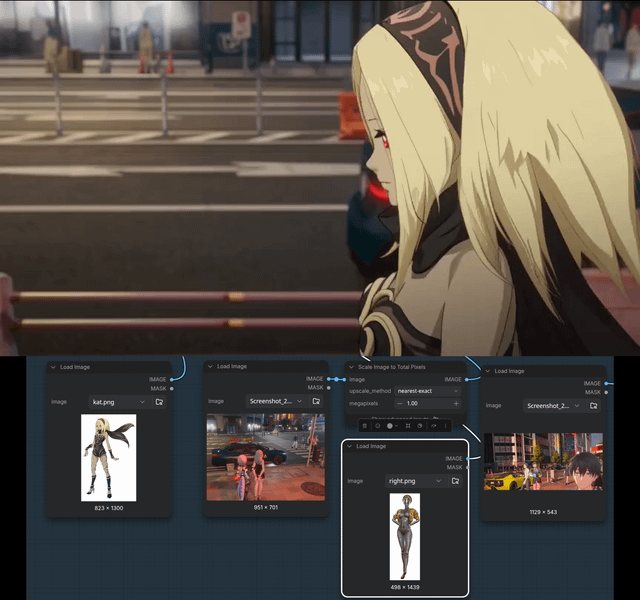
is the woman in . is the art style and general environment of and . is the character in . [Shot 1] The video starts with a side view of walking forwards on the side walk. In the background, we hear distant footstep sounds gradually getting closer and closer. [Shot 2] At 00:03.000, the camera cuts to a front view of turning around to see what the noise is. She sees running at her with malicious intent. She is far away, about a block away, but she is rapidly approaching. The camera then zooms in from the current position to a wide angle close up that shows running fastly towards . The camera tracks the fast, exaggerated movement of . [Shot 3] At 00:07.000, the camera cuts to a side view of . She turns around, away from the person chasing her. [Shot 4] At 00:08.000, the camera cuts to a back view of running quickly towards a car that is parked just ahead. She runs to the driver's seat. [Shot 5] At 00:09.500, the camera cuts to a close up view of the hand of opening the car door. [Shot 6] At 00:11.00, the camera cuts to a closeup view of hand turning on the car engine by turning the keys. [Shot 7] At 00:11.80, the camera cuts to foot slamming on the gas pedal. [Shot 8] At 00:12.70, the camera cuts to the back view of the car accelerating and driving off, while sprints behind the car, trying to catch up to her. overall_soundscape: City traffic noises and cars. We hear her footsteps as she walks. The video is entirely animated in the art style seen in .What it’s good for
Generates a multi-shot animated sequence with precise cinematic timing and camera movements. Useful for storyboarding, animation tests, or creating dynamic visual narratives.
How to use it
- Copy the prompt text exactly as shown
- Paste into MiniMax H3 video generation tool
- Run the generation and review the output
Does it actually hold up?
This prompt excels at providing extremely detailed cinematic direction with precise timing annotations (down to hundredths of seconds) and specific camera movements that most video generation models struggle with. The shot-by-shot breakdown with exact timestamps creates a coherent narrative flow that maintains continuity between actions. However, the prompt contains critical placeholder gaps ([character names], [art style references]) that will cause complete failure if not filled in – the model cannot infer what 'the art style seen in .' means without concrete references. The prompt also assumes the model can handle complex physical interactions like 'digs her fingers deep into the car's roof, and rips open an opening' which may exceed current video generation capabilities. This is best for experienced users who understand how to replace placeholders with specific style references and character descriptions, but will frustrate beginners expecting a copy-paste solution.
The tweak that makes it better
Replace all placeholder brackets with specific references: '[art style]' with 'Studio Ghibli style' or 'Cyberpunk 2077 concept art', and '[character]' with detailed descriptions like 'a woman with red hair wearing a leather jacket'. This gives the model concrete visual anchors instead of empty variables that will cause generation failures. The specificity helps the model maintain consistency across the complex multi-shot sequence.
Curated from the community via Reddit.