// Prompts
Cinematic Ship Scene Prompt
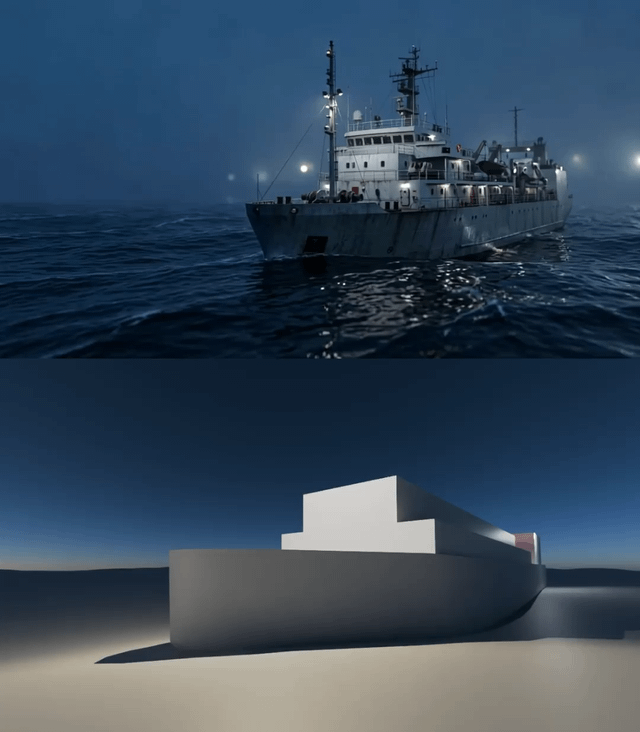
Transform a Blender depth map into a cinematic video sequence using LTX-2.3 IC-LoRA in ComfyUI, preserving structure while adding realistic motion and ligh
LDLatentDaily Desk
Jul 23, 2026
1 min read
Transform a Blender depth map into a cinematic video sequence using LTX-2.3 IC-LoRA in ComfyUI, preserving structure while adding realistic motion and lighting.
🤖 Works with: LTX-2.3 IC-LoRA in ComfyUI
The Prompt
Copy and paste — replace anything in [brackets].
Cinematic night sequence of a highly detailed, weathered industrial ship navigating a moderately choppy dark ocean with ambient fog. The ship is realistically illuminated by bright mast and deck lights. The ship moves from the right side of the frame towards the left, approaching the camera at a medium speed while swaying naturally with the waves. The camera tracks the movement,What it’s good for
Generate a cinematic video from a Blender depth map, enhancing rough renders with realistic lighting, motion, and atmosphere while maintaining scene composition.
How to use it
- Render a basic preview and depth map of your scene in Blender.
- Load the LTX-2.3 IC-LoRA workflow in ComfyUI and input your renders.
- Run the workflow with the provided prompt to generate the final video.
Curated from the community via Reddit.